Let’s be honest. Some things in a report just aren’t fun to look at, which is why some Marketing leaders skim past the schema section of a technical SEO audit. But it deserves a closer look now that Google’s AI Overviews and AI Mode, ChatGPT, and Claude answer many buyer questions before anyone clicks a link. Schema is one of the few technical items that describes your company directly to the systems building those answers.
What schema markup is
Schema markup, also called structured data, is code (usually JSON-LD) that labels the facts on a page using a shared vocabulary from Schema.org. A crawler reading your product page sees text. With schema, it also sees explicit statements like these:
- This page describes a product made by this company.
- The company is headquartered in Houston, Texas.
- These are the company’s official LinkedIn and Crunchbase profiles.
Here’s what schema looks like in code for a fictional valve manufacturer. This JSON-LD sits inside a script tag in the page’s HTML, so visitors never see it, but search engines and AI tools read it.
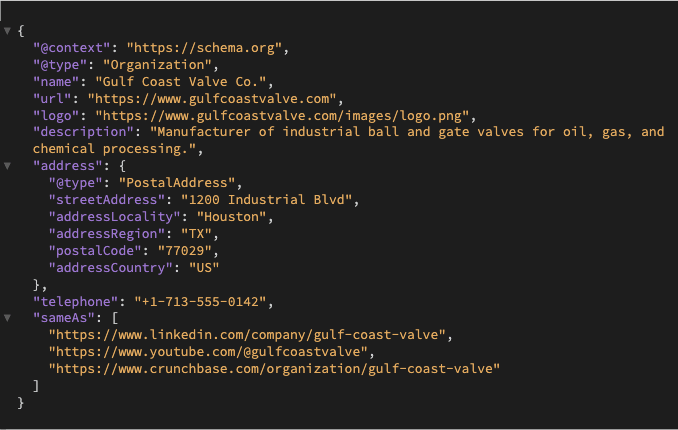
Each line is a fact stated plainly. Who the company is, where it’s located, and which profiles belong to it. The sameAs list is what helps search engines tell your company apart from others with similar names.
How schema helps in AI search
It removes guesswork. Google says structured data helps its systems understand a page, as long as the markup matches what visitors can see. Google also says you don’t need special markup to appear in AI Overviews or AI Mode. So schema won’t earn a citation on its own, but it makes sure search engines read your facts correctly when they do read your pages.
It separates you from similarly named companies. If your company name resembles another one, Organization markup with a sameAs property points search engines to your official profiles: LinkedIn, Google Business Profile, YouTube, and more if you have those. That makes it easier to keep your reputation attached to your company. It improves the odds but can’t guarantee it.
It still qualifies some pages for rich results. Google has cut back on rich results. FAQ rich results stopped appearing in 2026, HowTo results were dropped in 2023, and Google hasn’t shown review stars for a company’s reviews of itself since 2019. Product and Event markup still qualify for rich results where they apply, and Organization markup still supplies your logo and company details.
How to measure the impact of implementing schema markup
For rich results: Open Search Console’s Performance report and filter by Search appearance to see impressions and clicks for each rich result type. The separate rich result reports show which pages have valid markup and which have errors.
For AI citations: Pick a fixed set of buyer questions and check each month whether Google AI Overviews, ChatGPT, and Claude name or cite your company. Search Console counts AI Overview and AI Mode traffic inside your overall web search data, so it won’t show this on its own.
For organic traffic: Compare non-branded clicks and click-through rate on the pages you marked up, before and after launch, against similar pages you left alone. That comparison group keeps seasonality and algorithm updates from skewing the result.
Without schema, search engines and AI tools piece together your company’s details from whatever they can find. Schema hands them the facts in your own words. For a quick check, run your homepage and a key product page through two free tools:
- The Schema Markup Validator confirms your code is valid
- Google’s Rich Results Test shows whether Google can use it.
Both are useful, but neither tells you whether your markup is complete, matches what’s on the page, or connects your company to the right profiles. That’s where most B2B sites fall short, and it’s what our audit digs into.
Not sure your structured data is set up correctly? Request your free SEO and AI Visibility Audit to find out.